
Apple & Google Wallet Business Cards
Keep your digital business card where you keep your payment cards. With Bizcardy, you can add your card to Apple Wallet and Google Wallet so your details are always ready to share, even when you do not have your physical NFC card with you.
Keep Your Digital Business Card In Your Wallet App
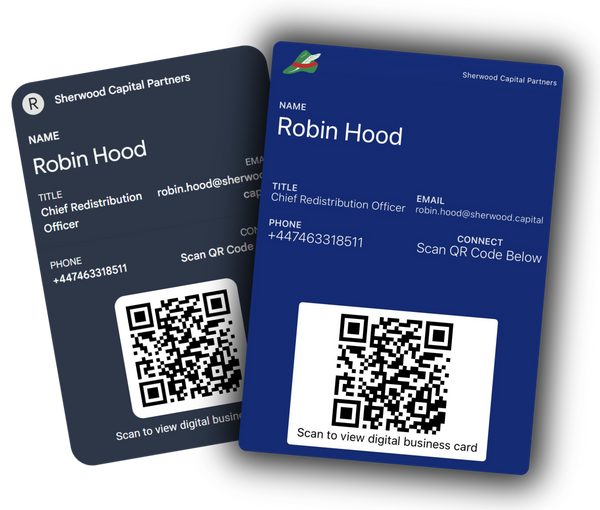
A wallet business card is a digital pass that lives inside Apple Wallet or Google Wallet. Instead of handing out paper cards, you simply open your wallet app and show your Bizcardy pass. People can scan the QR code or open your link and save your contact in one tap.
- Linked to your live digital business card profile
- Updated automatically when you change your details
- Easy to share in person and online
- Perfect as a backup to your NFC business card or as a fully digital option
How Wallet Business Cards Work
Create Your Digital Business Card
Sign up to Bizcardy and set up your digital business card with your photo, role, company, and all your important links.
Add To Apple Wallet & Google Wallet
From your dashboard, generate a wallet pass. With a couple of taps, your digital business card lives in your wallet app.
Share In Seconds
When networking, open your wallet app, pick your Bizcardy card and show the QR code. They scan it and save your contact.
Stay Up To Date
Change your details anytime. Your wallet pass and NFC card both point to the same profile, so everything stays in sync.
Three Ways To Share Your Wallet Business Card
Your Bizcardy wallet pass gives you several ways to share your details.
Tap Or Click From Your Phone
Open your wallet app, tap the Bizcardy card and share the link directly in messages, email or chat. Ideal for video calls and remote meetings.
Let Them Scan The QR Code
Each wallet business card includes a QR code. Show your phone, they scan the code, and your digital business card opens instantly.
Share Your Profile Link
Every wallet card connects to your Bizcardy link. Share it on social media, email signatures, or anywhere you want people to find you.
Who Wallet Business Cards Are For
Individuals & Freelancers
Go to conferences and networking events? A digital wallet business card means you are never caught without a way to share your details. It looks modern and saves time.
Students & Job Seekers
Use your wallet business card at careers fairs and assessment days. Show your Apple Wallet or Google Wallet pass, link to your CV, and stand out from the crowd.
Sales Teams & Field Staff
Keep digital business cards in wallet apps to share contact details, booking links and case studies during client visits. Pair with Bizcardy Teams for central management.
Creators & Agencies
Link your wallet business card to portfolios, reels and social pages. One scan takes a potential client from your wallet card straight to your best work.
Works On iPhone And Android
Bizcardy wallet business cards are designed for modern smartphones.
Apple Wallet
For iPhone users
Google Wallet
For Android users
Any Browser
Your link works everywhere
Wallet Business Cards And NFC Cards Together
If you already use Bizcardy NFC business cards, your wallet business card is the perfect backup. Your NFC card and your wallet pass both connect to the same digital business card.
Apple Wallet And Google Wallet FAQs
Do I need a physical NFC card to use a wallet business card?
No. You can use Bizcardy as a completely digital wallet business card if you prefer. Many users start with Apple Wallet and Google Wallet business cards and add an NFC card later.
Can I update my details after I add the card to my wallet?
Yes. When you change details on your Bizcardy profile, your digital business card is updated. People who visit your profile from your wallet pass will always see the latest information.
Will my wallet passes still work if I change phone?
Your wallet business cards are linked to your Apple and Google accounts. When you sign in on a new phone, you can restore your passes and keep sharing your Bizcardy digital business card.
Do people I meet need Apple Wallet or Google Wallet to see my card?
No. The wallet pass is for you. When you show your pass, they scan the QR code or open the link in their browser, and your digital business card loads like a normal web page on almost any smartphone.
Is my data secure?
Your Bizcardy wallet business card stores a link to your profile, not all of your personal data on the pass itself. You control what appears on your digital business card and can hide or remove information at any time.
Can I have both an NFC business card and a wallet business card?
Yes. In fact, they work best together. Your NFC card, wallet business card and digital business card all use the same profile, so you get a consistent experience and a single set of analytics.
Get Your Apple And Google Wallet Business Card Today
Turn your phone into a powerful digital business card. Add your Bizcardy profile to Apple Wallet and Google Wallet, share by tap, QR or link, and never run out of cards again.